- General
-
 Ideas
Ideas

0
How to create dependent custom options in Magento 2
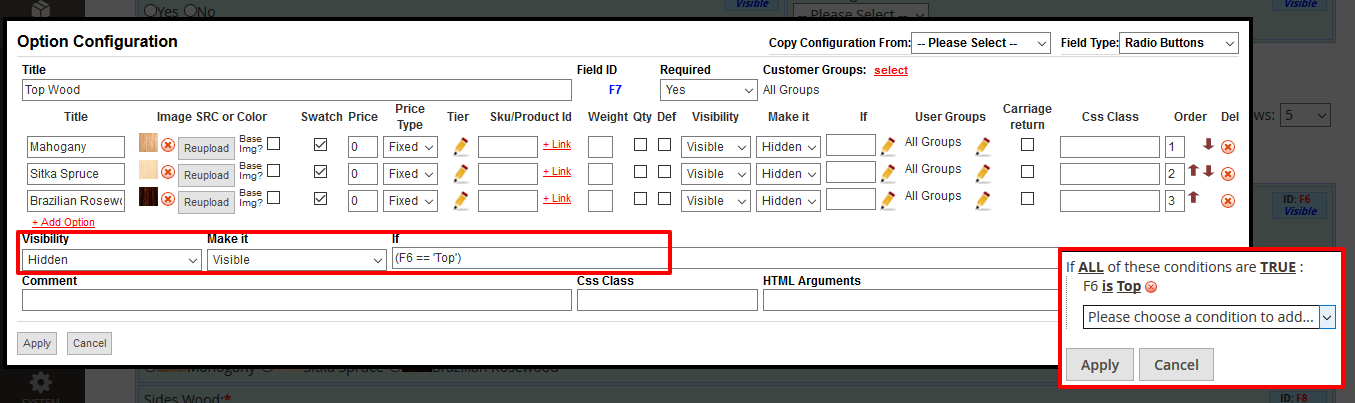
If you are the owner of a store, you might get into situation when you need to create dependent custom options, for instance, to apply custom design to products. By default Magento 2 won't allow that. The Dynamic Product Options extension includes dependent custom options, when one option or multiple options depend at the same time. Such options will help to make products visible or hidden if a specific choice is selected. Thus the options make the frontend's look more professional and easy to use.
If you want to make one option invisible unless the previous one is not selected or vice versa – dependent custom options will do the work for you.
Features of Dynamic Product Options:
- Configure and translate options for different store views separately
- Conditional branching. Make field or a group of fields dependent
- Ability to associate options to other products. If selected the associated product's inventory will be deducted after checkout
- Image and Color Swatches with ability to reload the Base Image
- Various validation rules
- Relative and absolute pricing, relative and absolute SKU, relative and absolute shipping weight
- Quantity for options
- Shipping weight for options
- Tier prices for options
- Developer tools: set CSS classes to fields, edit styles inline, CSS and JavaScript editors integrated
- Ability to Export/Import/Backup dynamic options via a file
- Ability to make fields visible for specific customer groups only
- Options templates. Associate templates to multiple products in bulk using Mass-Actions
- Ability to clone options
- Various fields
- Ability to upload images for radio buttons and check boxes
Customer support service by UserEcho
