
 Magento Product Video Extension by FME
As the name suggests, Magento product video extension allows to add product videos to product page. Product video makes a product page more informative and attractive. Customers can quickly get an idea of the product's functionalities and features through video. Magento product video extension by FME offers the following features.
- Upload videos from your device or embed them from video streaming sites i.e. YouTube, Vimeo etc.
- Attach multiple videos to product in the form of a video gallery.
- View, edit or disable Magento product video from a centralized back end.
- Upload video thumbnail.
- Restrict Magento product video to relevant products only.
- Customize video title and description.
For full features: Magento product video gallery extension
Help Curious Magento Customer with Product Questions Extension
Every customer wants to get all product questions cleared before they decide to purchase the product. A customer may have a bunch of queries regarding the product's functionality, the store's policies etc. Providing quick & easy answers to all the possible questions is extremely important to avoid cart abandonment.
Magento product questions extension by FME provides an easy solution to this. It creates a dedicated FAQ page as well as a product questions tab on every product page. The FAQ page allows you to list all your commonly asked questions in an attractive format along with their answers. The extension provides 5 different themes to display the FAQ page. You can also display your FAQs in accordion style. An important feature of this Magento product questions extension is the FAQ block. You can use the block anywhere on the page and limit the number of questions in the block. The product questions tab on every product page allows you to clarify all product related questions.
Apart from this, product questions Magento also creates an 'ask a question' form which allows customers to ask quick questions. Customers can like/unlike the questions asked by other customers. They can also rate and reply to questions. This Magento ask a question extension also sends you an email each time a customer asks a question. The email is sent to both the customer and the merchant.
One Page Checkout Magento Extension
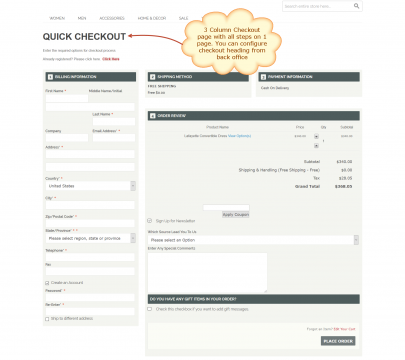
One page checkout extension for Magento by FME significantly simplifies the long and complex Magento checkout process. It makes it easy and shrinks it into a one page process. Simple & easy checkouts are often preferred as it does not irritate customers and allows them to complete their orders on a single page. One of the good features of Magento checkout extension by FME is that it is completely responsive and customers can access it from mobile devices. Another feature of this Magento extension is that it allows AJAX based loading which increases page load time and improves customer's shopping experience.
Features of Magento One Step Checkout Extension
Following are some of the features of one step checkout Magento extension by FME.
- Know customer source
- Add comments section
- Include customer registration form
- Customize theme
- Personalize color scheme
- Optimize title, description, URL & keywords of the checkout page
- Support all payment gateways
- Enable coupon code
Explore full features of One page checkout Magento extension
Magento 2 Store Switcher Extension
If you are running a Magento 2 multi store, store switcher is a must and highly productive extension for you to use. It gives your Magento 2 customers to enjoy a localized shopping experience. Magento 2 GeoIP store switcher detects visitor's location and redirects them to a local store. Customers get local language, currency and targeted products. This highly improves user's experience and increases conversions.
Localization is important for a multi store Magento 2 store. Every visitor should be redirected to their local store so that they read the entire store in their native language, pay in local currency and see targeted local products. Magento 2 store switcher does this. It accurately detects visitor's location from MaxMind database and automatically redirects them to a local store view.
One of the cool features of Magento 2 GeoIP extension by FME is that it also allows manual redirection. Anyone who does not want auto redirection can select the store from dropdown. Magento 2 admins can also bypass certain users from redirection by adding their IP's in IP exceptions.
Ajax Add to Cart Magento Extension
Magento Ajax add to cart extension by FME allows your Magento customers to experience an uninterrupted shopping experience. It allows them to add products to cart from category page without reloading or refreshing the page in order to get the cart updated. They can continue adding products to cart from category pages without having to go back or leaving the page to add more products. Ajax Add to cart Magento extension helps reduce page load time which leads to a low bounce rate. You can customize Ajax loading image and text, show related products, and add animation effects to get the most out of the extension. Some of the prominent features of Magento ajax add to cart are highlighted below.
- Customize Ajax loading image & text
- Enable 'continue shopping' button.
- Show related products on add to cart popup
- Display progress dialog
- Add animation effects while products are being added
- Customize Add to cart popup window
Magento Shop by Brand Extension
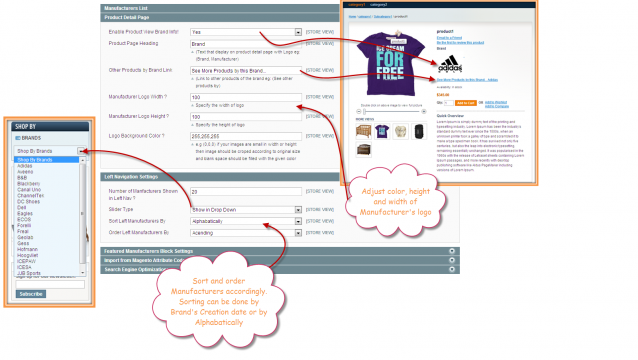
Magento shop by brand & manufacturer extension by FME is a great extension used to enhance user's shopping experience. It allows customers to easily search products of a specific brand, manufacturer or supplier. They can just type the name of the brand in the search box and Magento shop by brand extension will filter all the products from that brand.
Magento shop by brand extension allows you to create unlimited brands and attach products to each brand for easy navigation. You can also create a separate page for each brand and associate custom details with it. You can display brands with its title, URL, logo and short description. Magento customers can search brands by alphabetical characters i.e. A, B, etc.
A cool feature of Magento shop by manufacturer extension is that you can highlight prominent brands by displaying it in a featured block. You are empowered to show related brands in a block.
Powerful Features of Magento Shop by Brand Extension
- Implement shop by brand functionality
- Create unlimited brands and attach products to each brand
- Enable search for brand
- Allow users to search brands by alphabetic listing
- Display popular brands in featured block
- Show related brands in block
Add Magento Custom Registration Fields with Magento Customer Attributes Extension
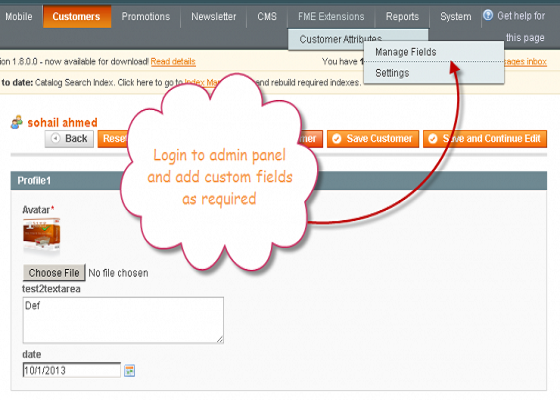
Magento customer attributes extension by FME has been specifically designed to create a custom registration form by allowing you to add custom fields to registration page. It empowers you to add 11 different types of fields like file upload, image upload, text box, text area, checkbox, radio button, date, Yes/No etc. You need extra customer fields to collect all types of data from customers so that you can better understand their needs and their preferences. FME's Magento customer attributes extension has features that let you customize the different options of the extension to make it more productive.
Features of Magento Customer Attributes Extension by FME
- Magento custom registration fields are editable by customers
- Add custom fields to either registration page, account page or both
- Set default value for Magento custom registration fields
- Validate input to make sure customers enter correct form of data
- Set positions
- Hide/Display a field after getting value
- Enter customized title
- Restrict the fields by customer groups
Recover Abandoned Carts with Magento Abandoned Cart Email
Magento abandoned cart email reminder enables you to re-target customers with abandoned carts by sending them auto reminder emails. It allows you to allure these customers to complete their order by offering them discount coupons. You can configure the different options of the Magento abandoned cart email to offer discounts in fixed amount or percentage, number of reminder emails to be sent, set discount coupons validity in days etc.
Easy Configuration Settings for Magento Abandoned Cart Email
- Customize subject of the reminder email
- Select email template
- Select payment method to show in email
- Enable/Disable email notifications
- Limit the number of emails to be sent
Manage Discount Coupons
- Enable/Disable discounts
- Offer discounts in fixed or percentage amount
- Setup minimum cart amount to get discounts
- Set validity for discount coupons
Muted Carts & Unsubscriptions with Magento Abandoned Cart
- Carts are muted after a specific number of emails are sent
- Review muted carts to activate or delete them
- Measure the success rate
Magento Video Gallery Extension by FME
Videos are important part of any online store. It makes the store more engaging and more informative. Magento video gallery extension lets you easily create a separate video gallery page. You can also add attractive videos and images to your product and category pages. Magento video extension allows you to either upload high quality videos from your local device or embed from popular video streams like YouTube etc. You can create unlimited media blocks to display videos with custom titles & description. Magento media gallery extension has the following useful features.
Attach Videos to Products / Category Pages:
Magento video gallery extension enables you to attach informative videos to products. They can include tutorials, video testimonials, user guides and videos explaining general policies of the store. Customers can get a better understanding of the products with the help of these videos.
Create Separate Media Gallery Page:
Apart from adding videos to product pages, you can also create a separate media gallery page with Magento media gallery. You can show the most popular videos with media slider. You can also edit the thumbnail size and image of the video.
Upload or Embed Videos:
Magento YouTube extension lets you easily upload videos from your device or embed from YouTube, Vimeo etc. Just paste the URL and the extension will fetch the video.
Rank your Videos:
With Magento media gallery extension, you can also rank your videos in search engines by customizing their titles, description and URL suffix.
Magento Partial Payment Extension by FME
Empower your customers with low purchasing power to pay for products in installments. Magento partial payment extension has been specifically designed by FME to facilitate customers who can't afford to pay the total price of a product in lump sum. It allows them to pay a certain amount of the product price at the time of purchase and the remaining amount in easy installments. The amount of the down payment and installments payment are determined by the store admin. Magento partial payment extension offers value to both merchants and customers. Customers get to buy the product without the burden of paying the full price and merchants prevent cart abandonment and get layaway payment. Magento layaway extension offers the following additional features.
- Configure Layaway Plans Globally or Specific to Products
Magento partial payments allows you to configure layaway plans globally for the entire store or specific to some products. Installment plan for the entire store will be applied to all the products in the store.
- Per Product or Per Order Layaway Plans
Store admins can configure installment plan per order or per product. An order can contain more than one product.
- Configuration Options
Store admins can configure layaway fee and down payment in fixed amount or as percentage of the product price. They can also configure the duration of the installments.
- Customer Account Section
Customers with partial payment can see all the details of their installments. They can view the following in their account.
- Order Details
- Remaining Layaway amount
- Installment history
- NO. of Installments paid
- NO. of Installment Remaining
- Time Period Allowed to pay remaining amount
- Last Date to clear all installments
Customer support service by UserEcho

